
Best Practice
Recruiting Pipeline Management
Managing a recruiting pipeline effectively means keeping candidate context, stage status, and next actions visible and accessible across your team — instead of buried in spreadsheets and inboxes.
Direct answer
A candidate pipeline is a structured view of people being considered for roles. A strong pipeline shows each candidate's source, stage, owner, evidence, and next follow-up so recruiters can move work forward without relying on memory.
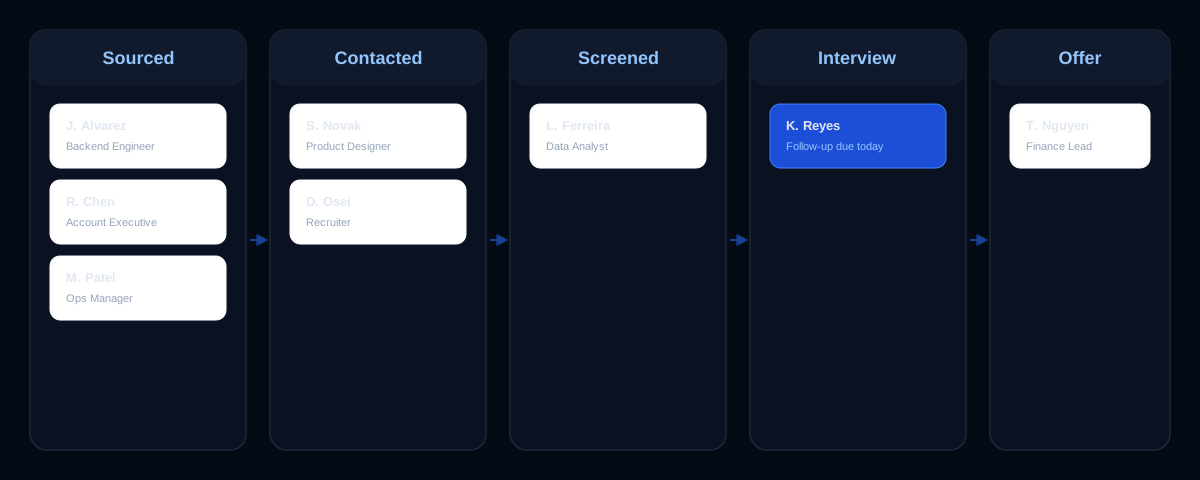
Define your pipeline stages
Common stages include Sourced, Contacted, Screened, Interview, Offer, and Hired. Customize stages to match your team's workflow and client requirements — a boutique search firm may need more nuance around client submission than a startup hiring team does.
If you use a seven-stage recruitment model, keep it simple: role intake, sourcing, outreach, screening, interview, offer, and hire or nurture. Add extra stages only when they change a decision, owner, or next action.
Build and maintain a talent pipeline
- Define the role and stage names
- Add sourced candidates with source context
- Assign an owner and next action
- Move candidates when evidence changes
- Review stalled candidates every week
A talent pipeline strategy should include both active candidates for current roles and nurture candidates who may fit future roles. Link your pipeline to a recruiting CRM so the notes, outreach history, and follow-up tasks stay with the candidate record.
Track pipeline health
Monitor conversion rates between stages, time-in-stage, and where candidates stall. See our hiring pipeline metrics guide for the specific numbers worth tracking.
Collaborate across the team
Assign candidate ownership, share recruiting notes, and keep task assignments current. A shared pipeline view reduces duplicate sourcing and ensures every candidate has a clear next action and owner.
A simple weekly pipeline review
- List every candidate who hasn't moved stage in 7+ days.
- Check that each active candidate has an owned follow-up task.
- Review sourcing campaign volume against open roles.
- Flag any client or hiring-manager updates that are overdue.
Common mistakes
- Using stage names that don't match how your team actually talks about candidates.
- Letting candidates sit in a stage with no owner or next action.
- Tracking pipeline health only when a client or hiring manager asks for an update.
- Assuming a clean pipeline view guarantees faster hires — it organizes work, it doesn't guarantee outcomes.
Frequently asked questions
What is a candidate pipeline?
A candidate pipeline is the organized flow of people being considered for current or future roles. It shows each candidate's stage, owner, status, and next action.
What is a hiring pipeline?
A hiring pipeline is the full workflow from role intake and sourcing through screening, interviews, offer, hire, rejection, or nurture.
What are the pipeline stages of hiring?
Common hiring pipeline stages include sourced, contacted, screened, submitted or shortlisted, interview, offer, hired, rejected, and nurture.
How do you build a strong talent pipeline?
Build a strong talent pipeline by defining role requirements, sourcing relevant candidates, logging outreach, tracking stages, assigning follow-ups, and reviewing stalled records weekly.
Does pipeline management guarantee faster hiring?
No. Organizing your pipeline makes bottlenecks visible, but outcomes still depend on your process, market conditions, and candidates — TalentSyncHQ does not guarantee hires, interviews, or placements.
Direct answer
A candidate pipeline is the organized workflow that shows who is being considered, where each person stands, what evidence exists, and what follow-up is due next. The strongest pipelines are not bigger lists; they are cleaner systems with clear stages, owners, notes, and review habits.
Use this page when the goal is informational: manage candidate and hiring pipelines. The content should stay focused on recruiter and hiring-team decisions, not job-seeker coaching or unsupported predictions.
Pipeline operating framework
A strong recruiting workflow is built from visible decisions. The team should be able to see the candidate record, the reason a person is in scope, the current stage, the next owner, and the evidence used for each hiring or recruiting decision.
- Define the role, must-have evidence, and stage names before adding candidates.
- Capture source, role fit, outreach status, owner, notes, and next action for every active candidate.
- Move candidates only when their evidence or decision status changes.
- Separate active, rejected, and nurture candidates so the active view stays honest.
- Review stalled records weekly and close or reassign anything without a next action.
| Workflow element | What to verify | Why it matters |
|---|---|---|
| Step 1 | Every candidate is tied to a role, future-fit segment, or sourcing campaign. | Keeps the workflow auditable, current, and useful for handoffs. |
| Step 2 | Every active candidate has one owner and one next action. | Keeps the workflow auditable, current, and useful for handoffs. |
| Step 3 | Stage names are decision points, not vague labels. | Keeps the workflow auditable, current, and useful for handoffs. |
| Step 4 | Interview notes and concerns are attached to the candidate record. | Keeps the workflow auditable, current, and useful for handoffs. |
| Step 5 | Metrics review includes time in stage and overdue follow-ups, not only candidate volume. | Keeps the workflow auditable, current, and useful for handoffs. |
Recruiter checklist
Run this checklist during weekly pipeline review, campaign review, or interview debrief. If a record fails the checklist, either update it, assign a next action, or move it out of the active workflow.
- Every candidate is tied to a role, future-fit segment, or sourcing campaign.
- Every active candidate has one owner and one next action.
- Stage names are decision points, not vague labels.
- Interview notes and concerns are attached to the candidate record.
- Metrics review includes time in stage and overdue follow-ups, not only candidate volume.
Implementation examples
Small hiring team
A founder-led team can use Sourced, Contacted, Screened, Interview, Offer, Hired, and Nurture. The key is not the exact labels; it is that each label triggers a clear next step.
Recruiting agency
An agency may add Submitted to Client and Client Feedback because those are real handoff moments that change ownership and follow-up timing.
Common mistakes to avoid
- Treating the pipeline as a storage list instead of an operating system.
- Keeping candidates active after there is no realistic next step.
- Using different stage definitions across recruiters.
- Letting interview evidence live outside the shared candidate record.
Limits and responsible use
TalentSyncHQ should support recruiter judgment, documentation, and collaboration. It should not be presented as a guarantee of hires, interviews, placements, response rates, or revenue.
- Pipeline software does not guarantee candidates, interviews, hires, or placements.
- A pipeline is only useful when recruiters update it close to the work.
- Do not use pipeline stages to encode protected-trait assumptions or unsupported judgments.
Operational playbook
Treat recruiting pipeline management as an operating habit, not a one-time setup task. The first pass should define fields, owners, and review cadence. The second pass should test whether a teammate can understand the record without asking the original recruiter for context. The third pass should remove stale work so the active view only shows candidates, campaigns, or decisions that still need action.
The best resource pages answer the immediate question and then show how to use the answer inside a recruiting workflow. That means every recommendation should tie back to a visible candidate record, a pipeline stage, a task, a note, a metric, or a human-reviewed decision. Avoid abstract advice that cannot be checked during a pipeline review or interview debrief.
When this workflow is implemented in TalentSyncHQ, the team should be able to open a candidate or campaign and see what happened, why it happened, who owns the next action, and what evidence is still missing. That trace is what makes the workflow useful for recruiters, founders, agencies, and hiring managers working from the same system.
| Decision point | What to capture | Review trigger |
|---|---|---|
| Entry | Source, role fit, campaign, owner, and reason the record exists. | Before outreach or before adding the record to an active stage. |
| Movement | Evidence, response, interview note, or client feedback that changed the status. | Whenever a candidate moves, stalls, rejects, or enters nurture. |
| Follow-up | Next action, due date, owner, and message context. | Daily for active searches and weekly for nurture segments. |
| Decision | Job-related evidence, missing information, concern, and human reviewer. | Before shortlist, rejection, client submission, offer, or archive. |
Step-by-step implementation
- Choose the primary workflow owner and document which team members can update records.
- Define the fields that must exist before a candidate, client search, or campaign becomes active.
- Map each field to a decision it supports so the team does not collect data for its own sake.
- Set a review cadence for active work, stale records, overdue tasks, and missing evidence.
- Create a handoff rule for any candidate who moves between recruiters, interviewers, or client owners.
- Review the workflow against fair-hiring expectations and remove protected-trait assumptions.
- Keep a short change log when stage names, scorecard criteria, or reporting definitions change.
This process gives the team a repeatable way to improve content quality, candidate experience, and recruiting visibility without inventing new claims. If a metric, note, or recommendation cannot be supported by the visible record, it should be rewritten as a question or follow-up.
Quality review before publishing
Before this guidance is treated as production-ready, review the page for search intent, internal links, metadata, schema, and accessibility. The page should answer one core intent, support related questions naturally, and avoid creating another page that competes for the same primary keyword.
- The primary keyword is unique and does not overlap with an existing stronger page.
- The H2 and H3 structure supports scanning on mobile and desktop.
- FAQs are visible on the page before they are marked up with FAQPage schema.
- HowTo schema is used only when the visible section contains actual steps.
- External references support process, compliance, or hiring context without fabricating data.
- Every CTA points to the next useful action: product, pricing, signup, or a related guide.
Editorial coverage requirements
The finished page should explain what the workflow is, when to use it, who owns it, which records it affects, and how the team knows whether it is working. A reader should leave with a practical model they can apply inside a recruiting CRM, candidate pipeline, sourcing campaign, outreach sequence, metrics review, or interview workflow.
Keep the page anchored to recruiting pipeline management, then support that keyword with related language such as candidate pipeline, hiring pipeline, talent pipeline management, recruiting workflow. These terms should appear only where they help explain the process. Do not force them into headings, image alt text, FAQs, or CTAs if they make the page sound unnatural.
The strongest version of this page includes examples for both small teams and agencies, because those readers often share the same workflow problem but need different levels of structure. A small team usually needs clarity, ownership, and fewer missed follow-ups. An agency usually needs campaign separation, client-specific notes, candidate reuse, and accurate status reporting across multiple searches.
If a section feels thin, expand it with an example, a decision rule, a checklist item, or a caution about responsible use. Do not add invented statistics, fake benchmarks, fake testimonials, or unsupported claims. If the page needs proof, use an authority reference for process context or a product screenshot/image brief that illustrates the workflow.
- Include a direct answer near the top for searchers who need the short version.
- Answer related People Also Ask-style questions in the body before the FAQ.
- Show how the workflow changes by team type, role type, or recruiting model.
- Explain what can go wrong when records, ownership, or evidence are missing.
- End with a conversion path that fits the reader's stage: related guide, pricing, or signup.
Frequently asked questions
What is a candidate pipeline?
A candidate pipeline is a structured view of candidates by role, stage, owner, evidence, and next action.
What are the pipeline stages of hiring?
Common stages include sourced, contacted, screened, interview, offer, hired, rejected, and nurture. Agencies may add submitted-to-client or client-feedback stages.
How do you maintain a talent pipeline?
Review stalled candidates, refresh notes, close inactive records, assign follow-ups, and keep nurture candidates grouped by future role fit.
What is a talent pipeline strategy?
It is the plan for which future roles need candidate pools, where those candidates come from, how they are contacted, and how the team keeps the relationship warm.
How do recruiters compare candidates?
Recruiters should compare candidates against role requirements, documented evidence, interview notes, follow-up status, availability, and job-related concerns.
How does TalentSyncHQ help?
TalentSyncHQ gives teams candidate records, pipeline stages, tasks, notes, and reports so recruiting work stays visible and reviewable.
Recommended internal links
Authority references
Suggested image briefs
candidate-pipeline-stages.webp
Create a clean board-style diagram with stages, owner, evidence, and next action labels. No fake product UI.
- Purpose
- Clarify stage flow
- Placement
- After the direct answer
- Alt text
- Candidate pipeline stages from sourced to hired and nurture
weekly-pipeline-review-checklist.webp
Create a simple checklist graphic for stalled candidates, overdue tasks, missing notes, and owner review.
- Purpose
- Show weekly review habit
- Placement
- Near the checklist
- Alt text
- Weekly recruiting pipeline review checklist
Use TalentSyncHQ to keep candidate stages, notes, tasks, and pipeline reviews in one recruiting workspace.
Create free account